
Use the HierarchyLookup command
Hierarchical data is data such as places which has a Country, Region, Town etc.
This article describes how to use the HierarchyLookup command to lookup data which is hierarchical and to resolve synonyms.
The command can also clean values before matching them (NormalizeText), and match values that are similar but not identical (SimilarityMatching).
Typical use case
You have case data with free-text subnational administrative place names. Each case record has these fields: Admin0Raw (ex: Country), Admin1Raw (ex: Province), Admin2Raw (ex: District).
You need to validate and match the freetext names with a reference table of geoplaces. Let’s call the reference table for geography REF_GEOPLACES. We will first show how to do a hierarchy lookup directly against the REF_GEOPLACES table, and then we will show how to use a synonym table to translate any freetext spelling variations to the reference table.
Example Table CASES (your input data)
| CASE_ID | Admin0Raw | Admin1Raw | Admin2Raw |
|---|---|---|---|
| 123 | BEN | ATACORA | Kouandé |
| 678 | BEN | DONGA | Bassila |
| 879 | BEN | DonGA | Unknown |
Table REF_GEOPLACES
Typical geography reference table
| PlaceID | Admin0 | Admin1 | Admin2 | GeoLevel |
|---|---|---|---|---|
| 27d0edf7 | BEN | 2 | ||
| 741b3ef2 | BEN | ATACORA | 3 | |
| b87f5228 | BEN | ATACORA | Kouandé | 4 |
| 25cb5755 | BEN | DONGA | 3 | |
| 7ad5511f | BEN | DONGA | Bassila | 4 |
The goal is to create a new PlaceID column in the input CASES table to hold the value from the matching PlaceID column from the REF_GEOPLACES table. Any failed lookup will be reported as a batch issue.
Note that matching is case insensitive.
Here is how to write such a lookup command. “Source” refers to the input CASES table. “Lookup” refers to the reference REF_GEOPLACES table.
  <Transform>
    <HierarchyLookup LookupTable="REF_GEOPLACES" RegisterMissingAsIssues="true">
      <Lookups LookupResult="ResolvedId" SourceResult="PlaceID">
        <Lookup Source="Admin0Raw" Lookup="Admin0" LookupFilter="GeoLevel = 2" />
        <Lookup Source="Admin1Raw" Lookup="Admin1" LookupFilter="GeoLevel = 3"  />
        <Lookup Source="Admin2Raw" Lookup="Admin2" LookupFilter="GeoLevel = 4"  />
      </Lookups>
    </HierarchyLookup>
  </Transform>
The order of the <Lookup> elements is defining the actual hierarchy of parent - child relationships. They must be ordered from the higher level to the lower one.
After resolution
In this example, we only requested the final PlaceID of the resolved geography (see last column at the end).
| CASE_ID | Admin0Raw | Admin1Raw | Admin2Raw | PlaceID |
|---|---|---|---|---|
| 123 | Ben | Atacora | Kouandé | b87f5228 (PlaceID of resolved admin2) |
| 123 | BEN | DonGA | Bassila | 7ad5511f (PlaceID of resolved admin2) |
| 123 | BEN | DonGA | Unknown | 25cb5755 (admin3 not resolved so PlaceID of resolved admin1) |
The command is also able to add a new column for each level of lookup that has been resolved. In each Lookup command, indicate which column from the reference table (LookupResult) should be put into which column of the cases table (SourceResult), as follows:
  <Transform>
    <HierarchyLookup LookupTable="REF_GEOPLACES" RegisterMissingAsIssues="true">
      <Lookups>
        <Lookup Source="Admin0Raw" Lookup="Admin0" LookupFilter="GeoLevel = 2" LookupResult="Admin0Name" SourceResult="ResolvedAdmin0" />
        <Lookup Source="Admin1Raw" Lookup="Admin1" LookupFilter="GeoLevel = 3" LookupResult="Admin1Name" SourceResult="ResolvedAdmin1" />
        <Lookup Source="Admin2Raw" Lookup="Admin2" LookupFilter="GeoLevel = 4" LookupResult="Admin2Name" SourceResult="ResolvedAdmin2" />
      </Lookups>
    </HierarchyLookup>
  </Transform>
| CASE_ID | Admin0Raw | Admin1Raw | Admin2Raw | ResolvedAdmin0 | ResolvedAdmin1 | ResolvedAdmin2 |
|---|---|---|---|---|---|---|
| 123 | BEN | Atacora | Kouandé | BEN | ATACORA | Kouandé |
| 123 | BEN | Donga | Bassila | BEN | DONGA | Bassila |
| 123 | BEN | DonGA | Unknown | BEN | DONGA | (null) |
All LookupResult and SourceResult in <Lookups> or <Lookup> are optional.
Support for Synonyms
The HierarchyLookup command can be configured to use a synonym table. A table of synonyms maps spelling variations in the source to the to fixed values in the lookup table.
Table REF_SYNONYMS example data
| Synonym | Reference | Category |
|---|---|---|
| Bénin | BEN | Geoplaces |
| Benin | BEN | Geoplaces |
In this example, both “Benin” and “Bénin” map to ISO3 code BEN. The value “BEN” must be in the lookup reference table. The synonym table is used in the HierarchyLookup command like this:
  <Transform>
    <HierarchyLookup LookupTable="REF_GEOPLACES" RegisterMissingAsIssues="true">
      <SynonymTable Code="REF_GEOSYNONYMS" FromColumn="Synonym" ToColumn="Reference" Filter="Category = 'Geoplaces'" />
      <Lookups LookupResult="ResolvedId" SourceResult="PlaceID">
        <Lookup Source="Country"  Lookup="Admin0" LookupFilter="GeoLevel = 2" />
        <Lookup Source="Province" Lookup="Admin1" LookupFilter="GeoLevel = 3" />
        <Lookup Source="District" Lookup="Admin2" LookupFilter="GeoLevel = 4" />
      </Lookups>
    </HierarchyLookup>
  </Transform>
Note that the column names of the synonym table can be anything as they are configurable. Also, the “Category” column in the synonym table is optional but is useful if different kinds of synonyms for different purposes are stored in the same synonym table.
Table REF_SYNONYMS suggested data model
| TABLE_CODE | FIELD_CODE | TITLE | Description | TYPE | IS_REQUIRED | IS_PRIMARY_KEY |
|---|---|---|---|---|---|---|
| REF_SYNONYMS | SYNONYM | Synonym | some other variation of a name | TEXT_450 | TRUE | TRUE |
| REF_SYNONYMS | REFERENCE | Reference | the name as it appears in the reference table | TEXT_450 | TRUE | TRUE |
| REF_SYNONYMS | CATEGORY | Category | can be used as an optional filter if some synonyms should only apply to a specific domain | TEXT_50 | FALSE | FALSE |
For example, if there are mixed ISO3 and country names in the same columns. Synonyms for Country name to ISO3 can be added.
Synonyms disambiguation thanks to children
What happens if the same synonym maps to different reference values?
For example, consider the following raw input data. AUS is ambiguous, as it could refer either to Australia (city = Sydney) or to Austria (city = Innsbruck).
| id | country | province | city |
|---|---|---|---|
| 333 | AUS | NSW | Sydney |
| 444 | AUS | Tyrol | Innsbruck |
| 555 | AUS | BOTH | Innsbruck |
| 666 | AUS | BOTH | Sydney |
The HierarchyLookup command is able to correctly resolve this using this synonym table:
- Table REF_Synonyms
| In | Out | Category |
|---|---|---|
| AUS | Australia | Geoplaces |
| AUS | Austria | Geoplaces |
How does HierarchyLookup know that sometimes AUS should map to Australia and sometimes map to Austria? It knows because synonyms are only resolved in the context of its parent and child values. In other words, HierarchyLookup doesn’t look at each level in isolation of the other; it looks at the combined result across all levels.
Example reference table Table REF_PLACES
| REF_Id | REF_Country | REF_Province | REF_City | REF_Level |
|---|---|---|---|---|
| 12 | Swiss | 1 | ||
| 20 | Australia | 1 | ||
| 8 | Austria | 1 | ||
| 201 | Australia | NSW | 2 | |
| 2010 | Australia | NSW | Sydney | 3 |
| 801 | Austria | Tyrol | 2 | |
| 8010 | Austria | Tyrol | Innsbruck | 3 |
In the reference table, only Australia has values NSW and Sydney and only Austria has values Tyrol and Inssbruck. During the lookup, the combination of these values will determine uniqueness of the result.
If a regular, non-hierarchical lookup (1 level only) is set up to only resolve admin level 0 (country), it won’t be able to resolve the country AUS as it would match multiple entries due to synonyms for AUS having 2 possible outcomes.
But by doing a lookup on admin level 0 and also admin level 1 and also admin level 2, HierarchyLookup will use the deeper level to resolve the upper one.
<Lookups LookupResult="ResolvedId" SourceResult="PlaceID">
  <Lookup Source="Country"  Lookup="REF_Country" LookupFilter="REF_Level = 1" />
  <Lookup Source="Province" Lookup="REF_Province" LookupFilter="REF_Level = 2" />
  <Lookup Source="District" Lookup="REF_City" LookupFilter="REF_Level = 3" />
</Lookups>
Here is how the matching process will look like.
- For row with id=333, trying to match first Lookup Country:
input data = 'AUS' - Augment with synonyms found for
In = 'AUS' -> ('Austria', 'Australia') - Found 2 entries in REF_PLACES for condition
REF_Country in ('AUS', 'Austria', 'Australia') and REF_Level = 1, so no match yet. - Go to next level Lookup Province,
input data = 'NSW' - Augment with synonyms found for
In = 'NSW' -> () - Found 1 single entry in REF_PLACES for condition
REF_Province in ('NSW') and REF_Level = 2, so match. ✅ - If match, go back to parent lookup and resolve to NSW’s Ref_Country -> ‘Australia’
Resolution of missing parents
Similarly to above disamiguation of missing parents. If input data contains some row like
| id | country | province |
|---|---|---|
| 333 | (empty) | NSW |
But the reference REF_PLACES contains a unique entry for REF_Country in ('AUS', 'Austria', 'Australia') and REF_Province = 'NSW' and REF_Level = 2.
The HierarchyLookup will be able to resolve the country of this row to ‘Australia’.
For this resolution of empty values to be enabled, the attribute <Lookups TryIfEmptyParent="true" /> needs to be set to true. By default, it’s set to false so won’t try to resolve such rows.
Output table
| id | country | province | resolvedCountry | resolvedProvince |
|---|---|---|---|---|
| 333 | (empty) | NSW | Australia | NSW |
Using NormalizeText
The examples in this section and the next one use a different data set: country names and polio case numbers (EPIDs).
Let’s say you receive case numbers (EPIDs). The same case number is not always written the same way: an extra dash, a leading zero, a year on 4 digits instead of 2.
NormalizeText cleans the text before it is matched, so these small differences don’t block the lookup.
Example Table STORING_DATA (your input data)
| COUNTRY_RAW | EPID_RAW |
|---|---|
| AFG | AFG/07/20/HC-026 |
| AFG | AFG/07/20/-HC-026 |
| AFG | AFG/07/20/-HC-0026 |
| ANG | ANG-BEN-CUB-25-005-C-1 |
| ANG | ANG-BEN-CUB-25-005-C1 |
| ANG | ANG-BEN-CUB-25-005-C01 |
| EGY | EGY-2024-483C3 |
Table EPIDs
The reference table holds one row per case: the country and the case number (EPID). For demo purposes, the NORMALIZED_VALUE column shows the normalized value of each case number. It does not have to be in the table: the lookup computes it, so we don’t use it.
| ID | COUNTRY | EPID | NORMALIZED_VALUE |
|---|---|---|---|
| 0 | AFG | AFG/07/20/HC-026 | AFG0720HC026 |
| 2 | ANG | ANG-BEN-CUB-25-005-C-1 | ANGBENCUB25005C1 |
| 6 | EGY | EGY-2024-483-C3 | EGY2024483C3 |
| 7 | ANG | ANG-BEN-CUB-25-005-C2 | ANGBENCUB25005C2 |
The goal is to link each EPID of the input table to its case in the EPIDs table, even when it is not written exactly the same way.
Here is how to write such a lookup command. The <NormalizeText> element goes inside the <Lookup> element and only applies to that level. In this example it is used together with <SimilarityMatching>, which is explained in the next section.
  <Transform>
    <HierarchyLookup LookupTable="EPIDS" RegisterMissingAsIssues="ErrorRemoveRows">
      <Lookups TryIfEmptyParent="true" LookupResult="ID" SourceResult="MATCHED_ID">
        <Lookup Source="COUNTRY_RAW" Lookup="COUNTRY" />
        <Lookup Source="EPID_RAW" SourceResult="FOUND_EPID" LookupResult="EPID" Lookup="EPID">
          <NormalizeText Accents="Remove" LeadingZeros="RemoveAll" Punctuation="Remove" Years="ReduceTo2Digits" />
          <SimilarityMatching AutoMatchThreshold="80" ManualMatchThreshold="70" RejectDigits="true" />
        </Lookup>
      </Lookups>
    </HierarchyLookup>
  </Transform>
Note that HierarchyLookup also works with a single <Lookup> level. Here, the COUNTRY level limits the search to the cases of the same country, which helps because an EPID does not always contain the country.
Without NormalizeText
If the lookup has no <NormalizeText> and no <SimilarityMatching>, like this one:
  <Transform>
    <HierarchyLookup LookupTable="EPIDS" RegisterMissingAsIssues="ErrorRemoveRows">
      <Lookups TryIfEmptyParent="true" LookupResult="ID" SourceResult="MATCHED_ID">
        <Lookup Source="COUNTRY_RAW" Lookup="COUNTRY" />
        <Lookup Source="EPID_RAW" SourceResult="FOUND_EPID" LookupResult="EPID" Lookup="EPID">
        </Lookup>
      </Lookups>
    </HierarchyLookup>
  </Transform>
only the values written exactly as in the EPID column are found:
| EPID_RAW | FOUND_EPID |
|---|---|
| AFG/07/20/HC-026 | AFG/07/20/HC-026 |
| AFG/07/20/-HC-026 | (failed lookup) |
| AFG/07/20/-HC-0026 | (failed lookup) |
| ANG-BEN-CUB-25-005-C-1 | ANG-BEN-CUB-25-005-C-1 |
| ANG-BEN-CUB-25-005-C1 | (failed lookup) |
| ANG-BEN-CUB-25-005-C01 | (failed lookup) |
| EGY-2024-483C3 | (failed lookup) |
The other five are reported as failed lookups, and someone would have to add a synonym for each of them.
NormalizeText options
Each option controls one kind of cleaning. An empty <NormalizeText /> uses the default values.
| Option | Values | Default | Example |
|---|---|---|---|
| Accents | Keep, Remove | Remove | Kouandé becomes Kouande |
| LeadingZeros | Keep, RemoveStart, RemoveAll | RemoveStart | RemoveAll: ABC-C0001 becomes ABC-C1 |
| Years | Keep, ReduceTo2Digits | Keep | 2025 becomes 25 |
| Punctuation | Keep, Remove, ReplaceWithSpace | Keep | Remove: Saint-Pierre becomes SaintPierre |
| Whitespace | Keep, Normalize, RemoveAll | Normalize | RemoveAll: ` Saint Pierre ` becomes SaintPierre |
| ChangeCase | None, Upper, Lower | None | Upper: Peru becomes PERU |
Note that matching is case sensitive after NormalizeText: A and a are different. Use ChangeCase="Upper" if the case can vary in your data.
After resolution
HierarchyLookup tries three steps, in this order, and stops at the first one that finds a match:
- Exact match: the value, as written in your file, is compared with the lookup column.
- Synonyms: the value is looked up in the synonym table.
- Similarity: the value is compared with the lookup column after NormalizeText, and each row gets a score.
With the lookup command shown above, using <NormalizeText> and <SimilarityMatching>, all seven case numbers are found:
| EPID_RAW | FOUND_EPID | MATCHED_ID |
|---|---|---|
| AFG/07/20/HC-026 | AFG/07/20/HC-026 | 0 |
| AFG/07/20/-HC-026 | AFG/07/20/HC-026 | 0 |
| AFG/07/20/-HC-0026 | AFG/07/20/HC-026 | 0 |
| ANG-BEN-CUB-25-005-C-1 | ANG-BEN-CUB-25-005-C-1 | 2 |
| ANG-BEN-CUB-25-005-C1 | ANG-BEN-CUB-25-005-C-1 | 2 |
| ANG-BEN-CUB-25-005-C01 | ANG-BEN-CUB-25-005-C-1 | 2 |
| EGY-2024-483C3 | EGY-2024-483-C3 | 6 |
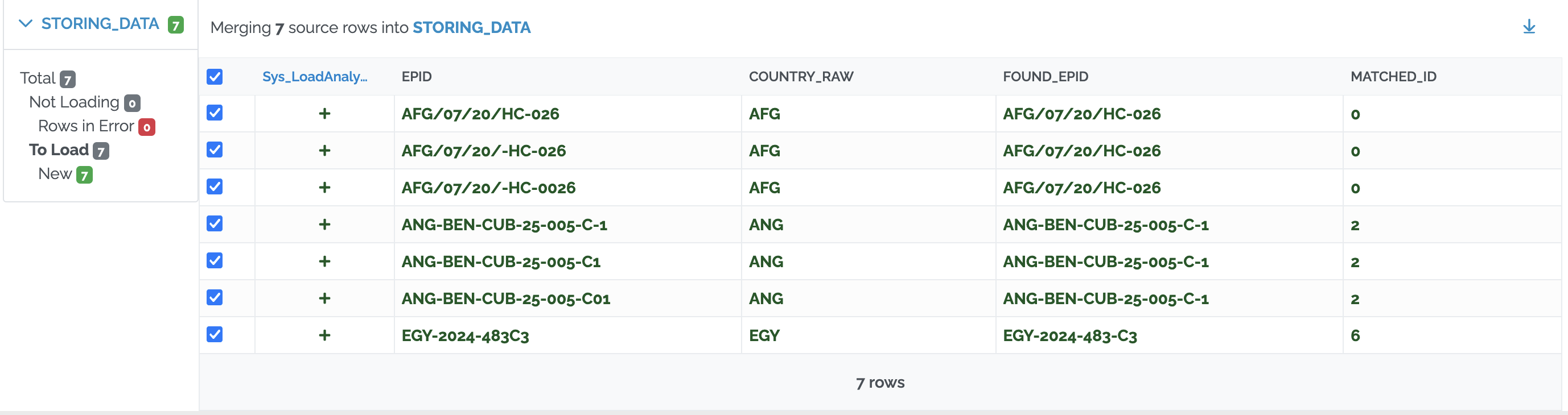
AFG/07/20/HC-026 and ANG-BEN-CUB-25-005-C-1 are written exactly as in the EPID column, so they are found at step 1. The other five are not, so they go on to step 3. Each one scores high enough against a case of its country to be matched automatically.
Using SimilarityMatching
SimilarityMatching allows matching of values that are similar but not identical, for example a spelling mistake in a country name. This avoids creating synonyms for small spelling variations.
Each possible match gets a similarity score from 0% to 100%. Depending on the score, the value is matched automatically, the data loader chooses from a list of suggestions, or it is reported as a normal lookup issue.
Example Table STORING_DATA (your input data)
| COUNTRY_RAW |
|---|
| Portugals |
Table GEO_DATA
| ID | NAME | LEVEL_ID |
|---|---|---|
| 0 | Portugal | 0 |
| 1 | Spain | 0 |
| 2 | Greece | 0 |
| 3 | Paraguai | 0 |
| 4 | Peru | 0 |
Here is how to write such a lookup command. Like NormalizeText, <SimilarityMatching> goes inside the <Lookup> element, so you can use it on some levels and not on others.
  <Transform>
    <HierarchyLookup LookupTable="GEO_DATA" RegisterMissingAsIssues="ErrorRemoveRows">
      <SynonymTable Code="SYNONYM" FromColumn="SOURCE" ToColumn="TARGET" />
      <Lookups TryIfEmptyParent="true">
        <Lookup Source="COUNTRY_RAW" SourceResult="COUNTRY_ID" LookupResult="ID" LookupFilter="LEVEL_ID = 0" Lookup="NAME">
          <NormalizeText />
          <SimilarityMatching AutoMatchThreshold="80" ManualMatchThreshold="70" />
        </Lookup>
      </Lookups>
    </HierarchyLookup>
  </Transform>
| Attribute | Description |
|---|---|
| AutoMatchThreshold | Minimum score for a match to be accepted automatically, without review, provided no other candidate scores comparably close. |
| ManualMatchThreshold | Minimum score for a match to be shown to the data loader as a suggestion. Default 0: all possible matches are shown. |
| RejectDigits | Default true: if at least one digit is different, the score is 0. This avoids matching District 1 with District 2, or two different case numbers. |
How the thresholds work
With AutoMatchThreshold="80" and ManualMatchThreshold="70":
| Best score | Result |
|---|---|
| 80% or more | Matched automatically. |
| 70% to 79% | Lookup issue. The data loader chooses from the suggestions. |
| Below 70% | Lookup issue with no suggestions. The data loader adds a synonym or a new row to the lookup table. |
After resolution
With the lookup command shown above, Portugals is not in the GEO_DATA table, but it is similar enough to Portugal to be matched automatically. COUNTRY_ID gets the value 0 (Portugal), and no lookup issue is reported:
| COUNTRY_RAW | COUNTRY_ID |
|---|---|
| Portugals | 0 |

What the data loader sees
Lookup issues are resolved in the Issues tab of the batch (see Resolve Lookups in UI).
Without SimilarityMatching, the list of references shows all the values of the lookup table. For example, with this lookup command:
  <Transform>
    <HierarchyLookup LookupTable="GEO_DATA" RegisterMissingAsIssues="ErrorRemoveRows">
      <SynonymTable Code="SYNONYM" FromColumn="SOURCE" ToColumn="TARGET" />
      <Lookups TryIfEmptyParent="true">
        <Lookup Source="COUNTRY_RAW" SourceResult="COUNTRY_ID" LookupResult="ID" LookupFilter="LEVEL_ID = 0" Lookup="NAME">
        </Lookup>
      </Lookups>
    </HierarchyLookup>
  </Transform>
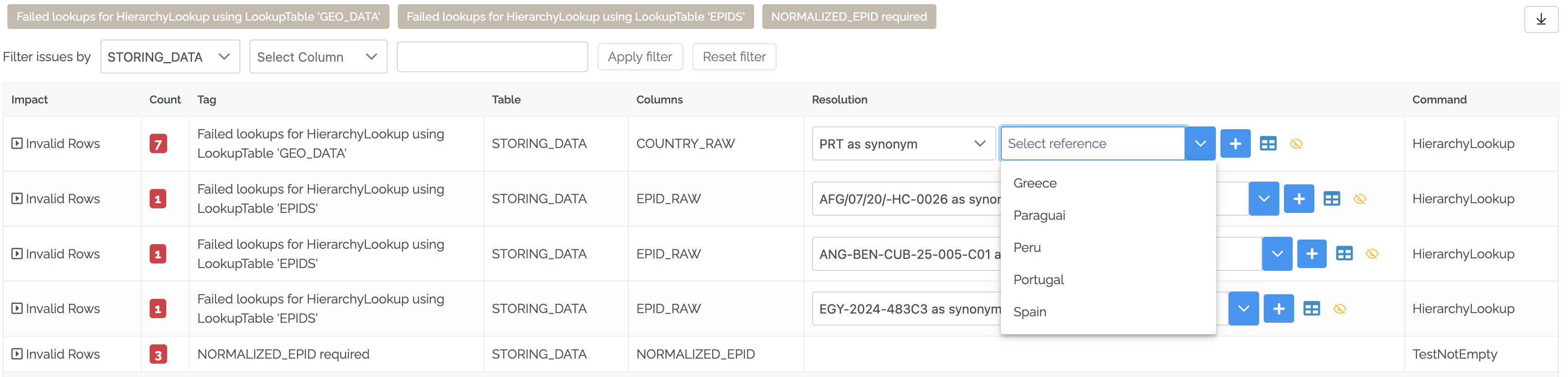
In this example, PRT is not found in GEO_DATA. The list of references shows all five countries, in alphabetical order.
With SimilarityMatching, the list only shows the values that score at or above ManualMatchThreshold, with their score. See the case numbers in RejectDigits below for an example.
If no value reaches ManualMatchThreshold, the list is empty. With the lookup command below, no country is similar enough to PRT:
  <Transform>
    <HierarchyLookup LookupTable="GEO_DATA" RegisterMissingAsIssues="ErrorRemoveRows">
      <SynonymTable Code="SYNONYM" FromColumn="SOURCE" ToColumn="TARGET" />
      <Lookups TryIfEmptyParent="true">
        <Lookup Source="COUNTRY_RAW" SourceResult="COUNTRY_ID" LookupResult="ID" LookupFilter="LEVEL_ID = 0" Lookup="NAME">
          <NormalizeText />
          <SimilarityMatching AutoMatchThreshold="80" ManualMatchThreshold="26" />
        </Lookup>
      </Lookups>
    </HierarchyLookup>
  </Transform>
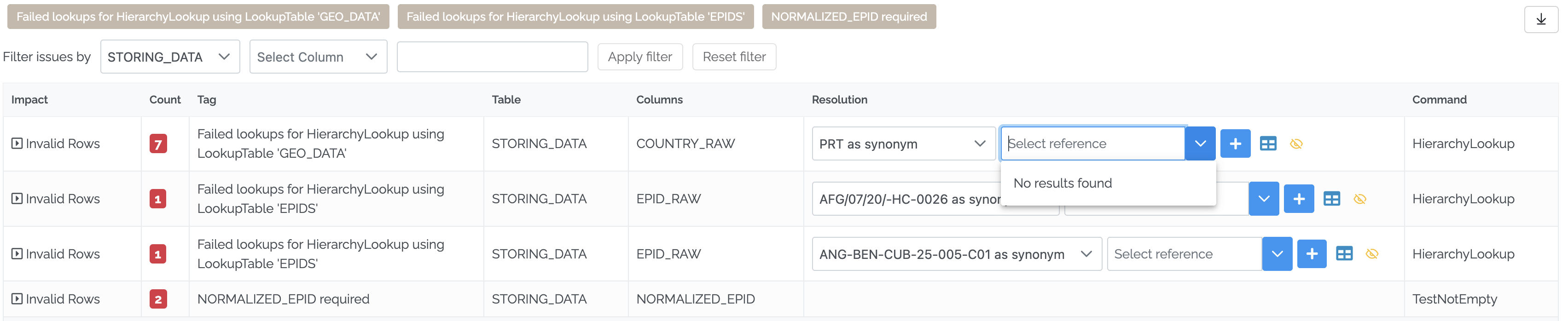
Note that the score compares the spelling, not the meaning. PRT is the code of Portugal, but it is not similar to “Portugal”. Codes still need synonyms. Synonyms are checked before SimilarityMatching, so a synonym always wins.
Adding a synonym when there is no suggestion
With the lookup command shown at the start of this section (ManualMatchThreshold="70"), and an empty SYNONYM table, PRT is reported as a failed lookup. The list of references is empty, because no country scores 70% or more:

Typing Portugal in the box does not help. With SimilarityMatching, the list only contains the suggestions, so Portugal cannot be selected from it:

The first list, in the Resolution column, decides what the + button does:
- PRT as synonym: adds
PRTto the synonym table. - PRT to GEO_DATA: adds
PRTas a new row in the lookup table.

To add the synonym, keep PRT as synonym selected in the first list and click the + button. The Add new SYNONYM window opens, with PRT already filled in as the Source. Type Portugal as the Target and click Save:
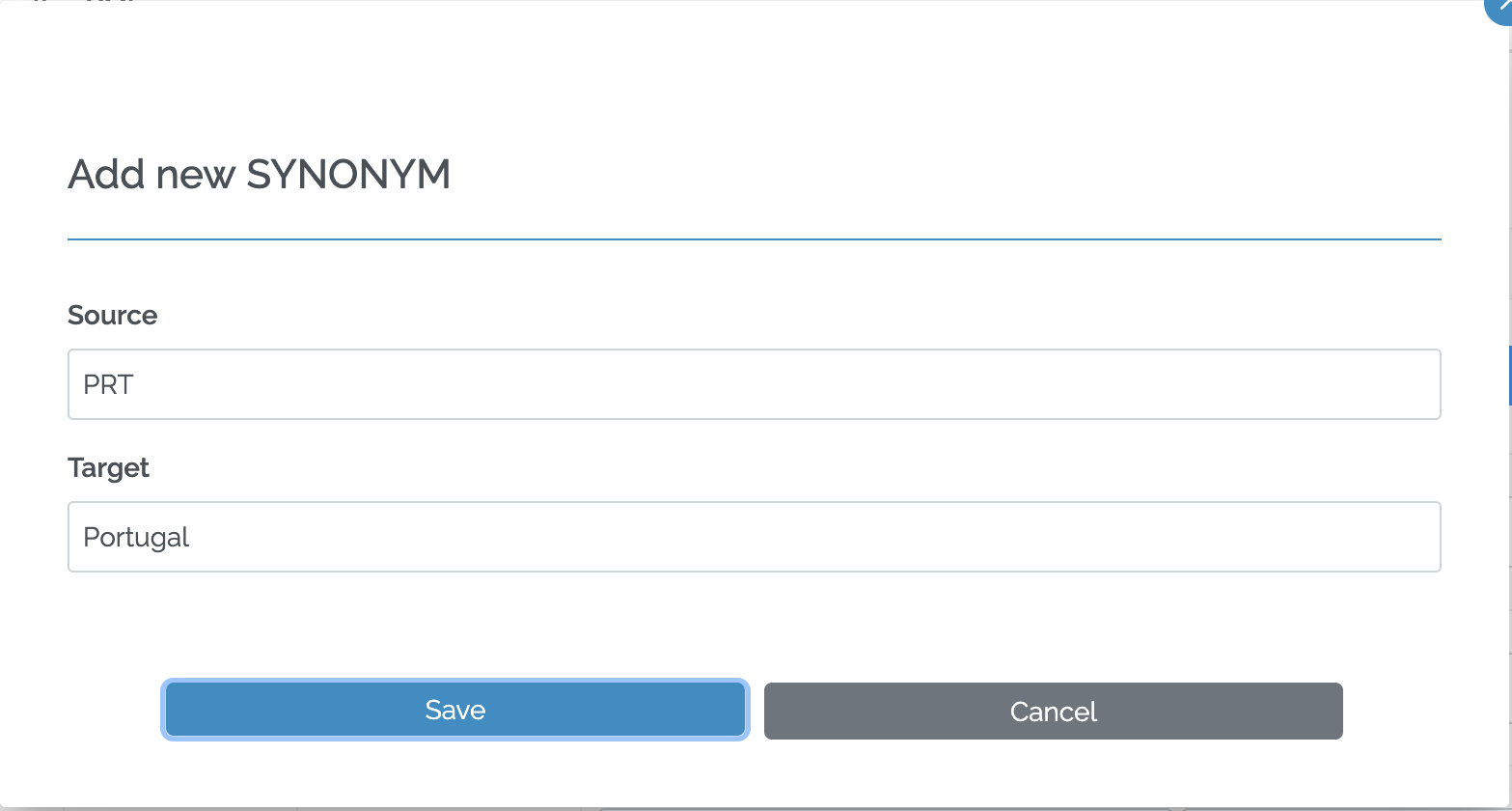
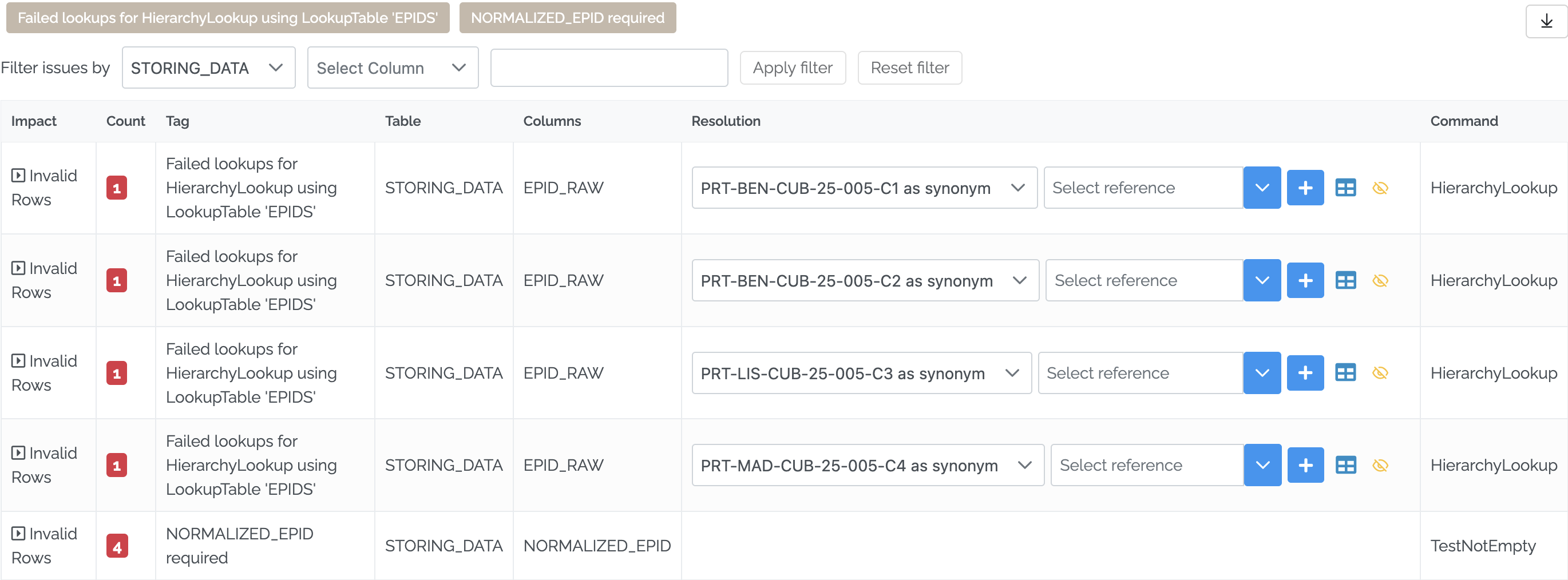
The synonym is saved in the SYNONYM table. Load the file again: this time PRT is found through the synonym, and there is no failed lookup for GEO_DATA anymore. Only the case numbers, which are not in the EPIDS table, are still reported:
RejectDigits
By default, RejectDigits is true: if at least one digit is different, the score is 0. This avoids suggesting District 2 for District 1, or a different case number.
Let’s say you receive these case numbers, which are not in the EPIDS table:
| EPID_RAW |
|---|
| PRT-BEN-CUB-25-005-C1 |
| PRT-BEN-CUB-25-005-C2 |
| PRT-LIS-CUB-25-005-C3 |
| PRT-MAD-CUB-25-005-C4 |
With RejectDigits="true":
  <Transform>
    <HierarchyLookup LookupTable="EPIDS" RegisterMissingAsIssues="ErrorRemoveRows">
      <SynonymTable Code="SYNONYM" FromColumn="SOURCE" ToColumn="TARGET" />
      <Lookups TryIfEmptyParent="true" LookupResult="ID" SourceResult="MATCHED_ID">
        <Lookup Source="EPID_RAW" SourceResult="FOUND_EPID" LookupResult="EPID" Lookup="EPID">
          <NormalizeText Accents="Remove" LeadingZeros="RemoveAll" Punctuation="Remove" Years="ReduceTo2Digits" />
          <SimilarityMatching AutoMatchThreshold="80" ManualMatchThreshold="70" RejectDigits="true" />
        </Lookup>
      </Lookups>
    </HierarchyLookup>
  </Transform>
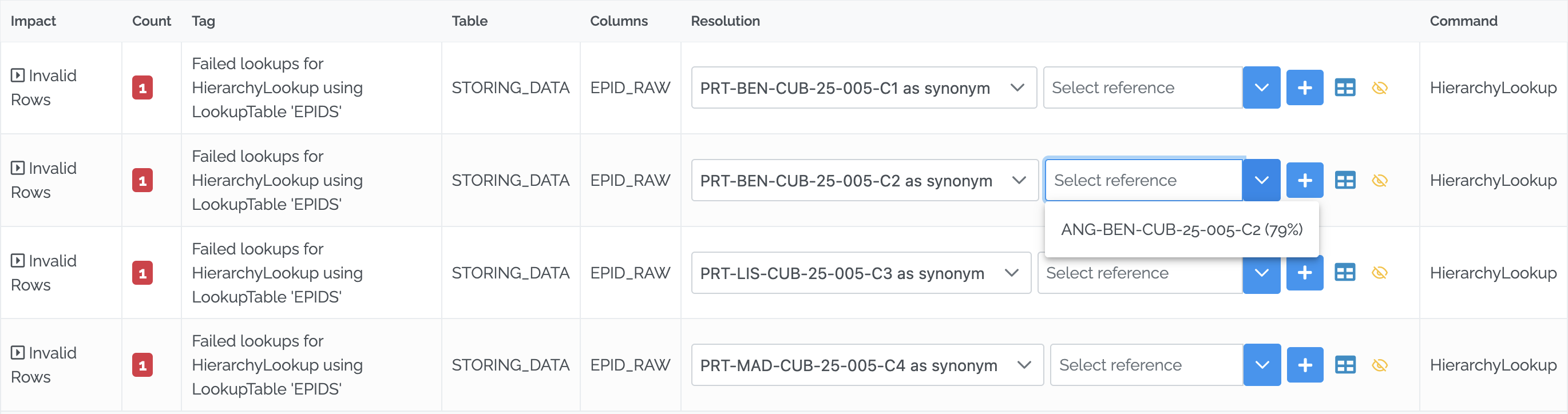
PRT-BEN-CUB-25-005-C2 gets one suggestion: ANG-BEN-CUB-25-005-C2 (79%), which has the same digits. The other case numbers of the EPIDS table have different digits, so they are not suggested. In the same way, PRT-BEN-CUB-25-005-C1 gets only ANG-BEN-CUB-25-005-C-1 (79%).
With RejectDigits="false":
  <Transform>
    <HierarchyLookup LookupTable="EPIDS" RegisterMissingAsIssues="ErrorRemoveRows">
      <SynonymTable Code="SYNONYM" FromColumn="SOURCE" ToColumn="TARGET" />
      <Lookups TryIfEmptyParent="true" LookupResult="ID" SourceResult="MATCHED_ID">
        <Lookup Source="EPID_RAW" SourceResult="FOUND_EPID" LookupResult="EPID" Lookup="EPID">
          <NormalizeText Accents="Remove" LeadingZeros="RemoveAll" Punctuation="Remove" Years="ReduceTo2Digits" />
          <SimilarityMatching AutoMatchThreshold="80" ManualMatchThreshold="70" RejectDigits="false" />
        </Lookup>
      </Lookups>
    </HierarchyLookup>
  </Transform>
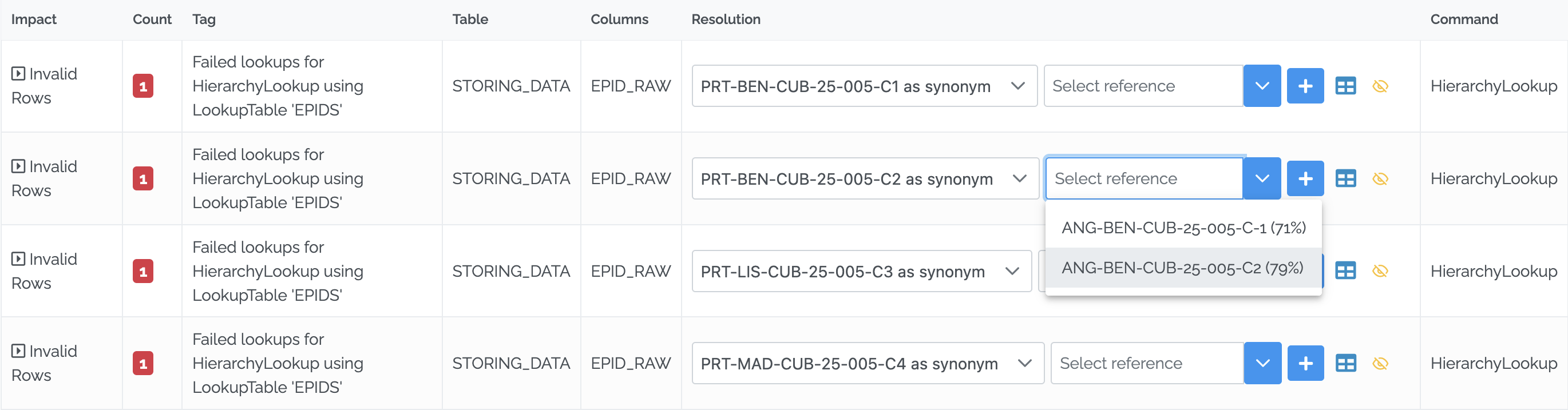
The same row now gets two suggestions. Besides ANG-BEN-CUB-25-005-C2 (79%), it also gets ANG-BEN-CUB-25-005-C-1 (71%), which is a different case number (C1 instead of C2). In the same way, PRT-BEN-CUB-25-005-C1 now also gets ANG-BEN-CUB-25-005-C2 (71%).
Keep RejectDigits="true" for codes and case numbers, so that the data loader is not offered the wrong case.
Lowering ManualMatchThreshold
In the two examples above, PRT-LIS-CUB-25-005-C3 gets no suggestion at all: “No results found”. Its best score is below 70, the value of ManualMatchThreshold.
If ManualMatchThreshold is lowered to 20:
  <Transform>
    <HierarchyLookup LookupTable="EPIDS" RegisterMissingAsIssues="ErrorRemoveRows">
      <SynonymTable Code="SYNONYM" FromColumn="SOURCE" ToColumn="TARGET" />
      <Lookups TryIfEmptyParent="true" LookupResult="ID" SourceResult="MATCHED_ID">
        <Lookup Source="EPID_RAW" SourceResult="FOUND_EPID" LookupResult="EPID" Lookup="EPID">
          <NormalizeText Accents="Remove" LeadingZeros="RemoveAll" Punctuation="Remove" Years="ReduceTo2Digits" />
          <SimilarityMatching AutoMatchThreshold="80" ManualMatchThreshold="20" RejectDigits="false" />
        </Lookup>
      </Lookups>
    </HierarchyLookup>
  </Transform>
the same row now gets two suggestions:
| Suggestion | Score |
|---|---|
| ANG-BEN-CUB-25-005-C-1 | 50% |
| ANG-BEN-CUB-25-005-C2 | 50% |
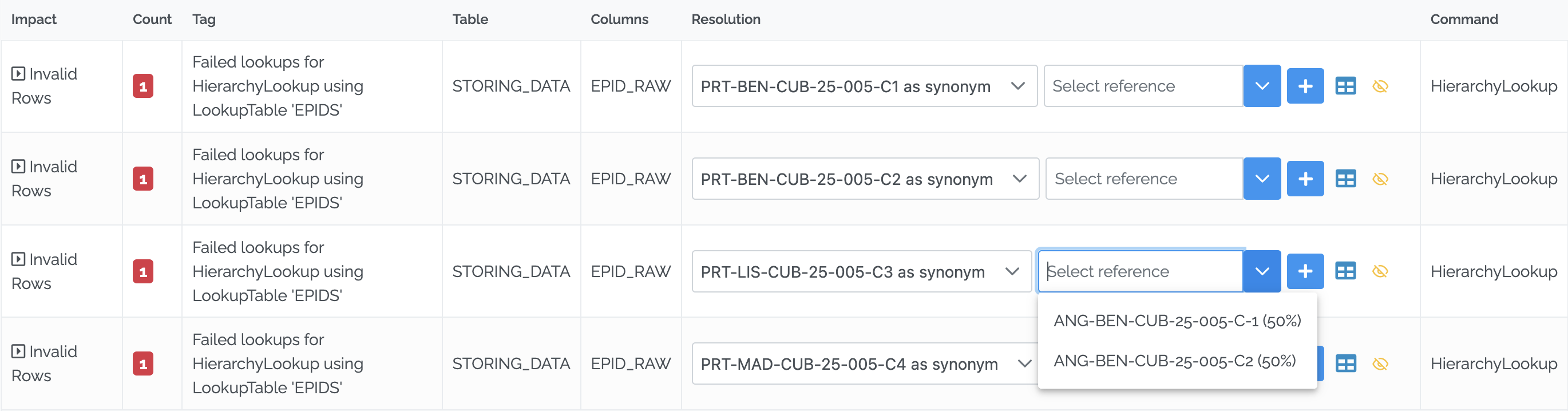
ManualMatchThreshold decides how long the list of suggestions is:
- A high value shows only the values that are very close. The list is short, and it can be empty.
- A low value shows more values, including ones that are not really similar. Here, both suggestions are different case numbers.
Choose a value that shows the data loader the likely matches, without filling the list with wrong ones.