
Register client app
External applications which need to access your data or trigger pipelines are treated like users. Analagous to a human user having a username and password, an application has a client ID and a client secret. This article describes the process for obtaining a client ID and secret for your application and how to use it in xMart.
Note that this article doesn’t apply to data which has been made public; you can skip this article!
Setup Summary
| Who/what | Action needed |
|---|---|
| End-user | Register client application in Azure Active Directory (obtain Client ID). |
| xMart service team | Authorize Client ID at system-level (ie Expose an API) |
| Mart Admin | Authorize Client ID at mart-level. See (see Authorizing a client app) |
| End-user, Client app | Authenticate using OAuth 2 by sending client id, client secret and xMart client id (contact xMart service team for xMart client ID) |
| End-user, Client app | Access the xMart secured API |
Register client application
To be performed by the end-user
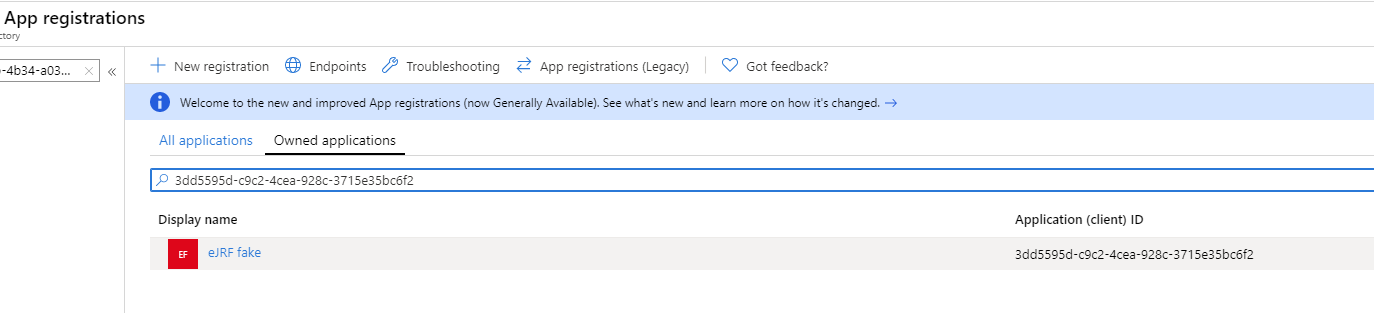
End-users can register their external applications in the AzureAD Portal to obtain a Client ID for the external application that needs access to the xMart API.
Let’s call this clientID externalClientID for future references.
Maybe an application has already been registered: if so, try to reuse it. If the application does not exist, create it.
Note that a registration does not need to be created for each little external app that your team uses (but you can do that too); they can be grouped under a single registration such as “Our team’s data apps”. This registration will have a single Client ID but many Client Secrets can be created. This single registration can be used by your team’s Power BI reports, Shiny R apps, Excel files. Logically and functioanlly, they can be considered part of the same “application” since they are all producing data outputs.
Generate a client secret
To be performed by the end-user
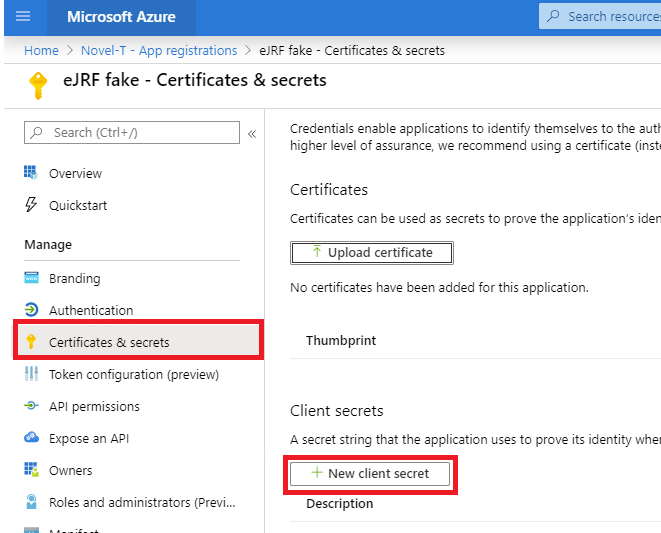
In the same AzureAD page, click Certificates & Secrets > New client secret. We’ll refer to this secret by externalClientSecret.
Authorize Client ID at system-level
To be performed by the xMart service team
Request the xMart team (xmart@who.int) to allow your client ID to consume xMart API.
For xMart team:
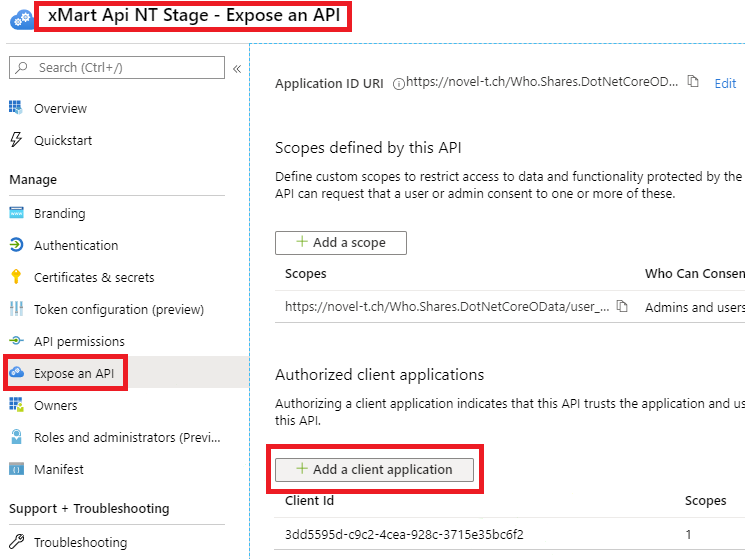
In WHO AzureAD Portal, find xMart API (Env) in App Registrations.
Get the clientID, we’ll call it xmartapiClientID. It will need to provided to the external app developer.
Open the app and select Expose an API, click Add a client application and paste the externalClientID.
Authorize Client ID at mart-level
To be performed by the end-user
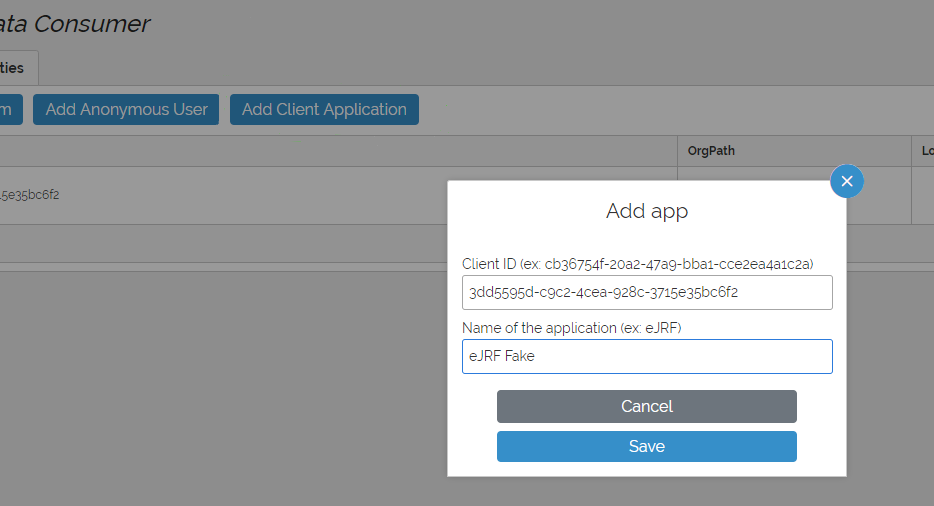
In xMart Admin UI of your mart, create or use an existing role that has DATA_VIEW permission for the mart or view(s) that need to be consumed by the external app.
Then, in Users, click the Add a Client application button.
Fill in the externalClientID received from previous step and wisely chosen friendly name.
Authenticate using OAuth 2
To be performed by the client app
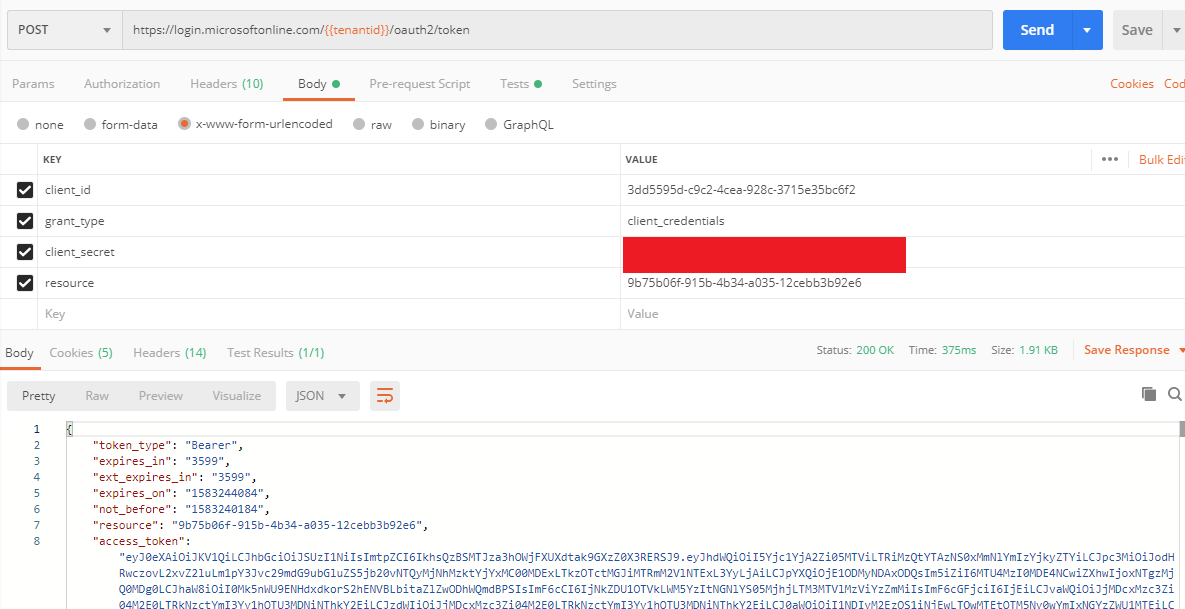
Request an accessToken to WHO AzureAD
POST request to https://login.microsoftonline.com/f610c0b7-bd24-4b39-810b-3dc280afb590/oauth2/token using the following body
grant_type: client_credentials
client_id: {external Client ID}
client_secret: {external Client Secret}
resource: {xmart Api Client ID}
xMart Client IDs are provided at the end of this article
Note, the resource parameter is not supported by oauth2/v2.0/token, it would be require a scope instead.
The AzureAD will return an accessToken.
Access the xMart secured API
To be performed by the client app
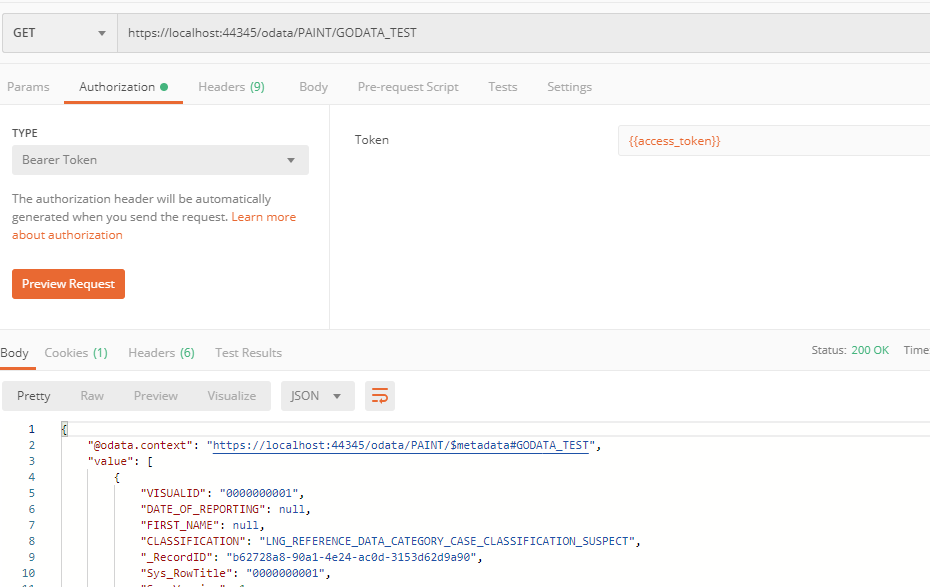
This is an example of accessing the OData API, but also applies to other API end-points such as the start origin web service.
GET request to https://portal-uat.who.int/xmart-api/odata/MART/VIEW_OR_TABLE HTTP Header
Authorization: Bearer
ALLOWED ✔️
Client IDs xMart UAT and Prod
xMart is actually 2 applications, 1) the “Main App”, which has the UI and also the API for triggering pipelines and 2) the “OData App”, which is the data retrieval service.
| Environment | OData App (read data) | Main App (trigger pipeline) |
|---|---|---|
| UAT | b85362d6-c259-490b-bd51-c0a730011bef | a40621b1-fd6e-421b-bc44-c406b629e967 |
| PROD | 712b0d0d-f9c5-4b7a-80d6-8a83ee014bca</ | af17443e-8983-46ad-942d-e56b89ab44f2 |